
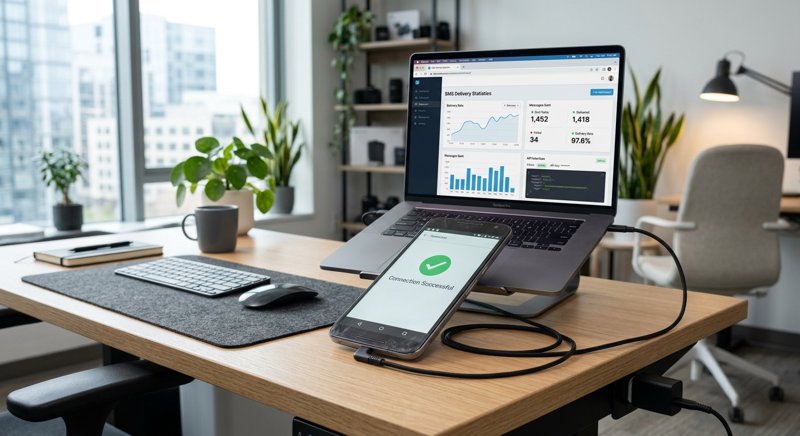
If you have a spare Android device sitting in a drawer, you are holding a powerful, cost-effective communication hub. By pairing this hardware with a free sms api for old phones, small businesses and developers can bypass expensive traditional telecom carriers and set up their own localized SMS gateway. This guide will show you exactly how to turn any old Android phone into a high-performance SMS API sender with zero monthly subscription fees.
Why Repurpose Old Android Devices as SMS Gateways?
For small service businesses like dental clinics, auto repair shops, tutoring centers, and salons, keeping customers informed is critical. Sending appointment reminders, booking confirmations, and "ready for pickup" alerts drastically reduces no-shows and keeps operations running smoothly. However, traditional cloud SMS providers like Twilio, MessageBird, and Plivo have made this increasingly difficult and expensive for small operations.
In 2026, traditional A2P (Application-to-Person) messaging is plagued by strict regulatory barriers. Businesses face complex 10DLC (10-Digit Long Code) registration, mandatory carrier approval processes, and high monthly fees just to keep a number active—even if they only send 100 texts a month. On top of that, traditional APIs charge per 160-character segment, meaning a single long reminder can cost double or triple the advertised rate.
By using a free android sms gateway software for old phones, you can bypass these hurdles entirely. This approach offers several distinct advantages:
- No Carrier Approval or 10DLC Registration: Because the messages are sent directly through your own SIM card, they travel over the standard peer-to-peer (P2P) network. You do not need to register your brand or wait weeks for approval.
- Use Your Existing Number: Customers will receive texts from a recognizable local mobile number, increasing trust and open rates.
- Flat-Rate Pricing: Avoid per-segment billing. Your local mobile carrier plan likely includes unlimited or highly discounted local SMS, meaning your outbound message costs are virtually zero.
- Breathe New Life into E-Waste: Instead of letting a functional Android phone gather dust, you turn it into a dedicated business gateway.
Finding the Best Free Android SMS Gateway Software for Old Phones
When searching for the best free android sms gateway app for old phones, you will encounter a few different categories of software. It is important to understand the trade-offs between completely open-source self-hosted tools, flat-rate monthly platforms, and modern developer-friendly platforms like MySMSGate.
Many older open-source projects are no longer maintained, meaning they struggle with modern Android battery optimization settings. When an old phone goes into sleep mode, these outdated apps stop listening for API requests, leading to missed notifications. On the other end of the spectrum, platforms like SMSGateway.me charge flat fees (such as $9.99/month) which quickly add up for low-volume senders.
MySMSGate bridges this gap. It offers a free-to-use Android gateway application combined with a pay-as-you-go API model that has no monthly subscription fees, no contracts, and a simple flat charge of $0.02 per SMS. If you do not send any messages, you do not pay a single cent.
Comparison: Traditional SMS APIs vs. Android SMS Gateways
To understand why using an old phone as a gateway is highly efficient for local businesses, let us look at the structural and cost differences:
| Feature | Traditional API (e.g., Twilio) | MySMSGate (Android Gateway) | |
|---|---|---|---|
| Setup Cost | High (Registration & verification fees) | Free ($0.00) | |
| Monthly Fee | Recurring fees for virtual numbers | $0.00 (No monthly subscription) | |
| 10DLC / Brand Approval | Mandatory (Weeks of waiting) | Not Required (Uses your SIM) | |
| Billing Structure | Charged per 160-character segment | Flat rate per message regardless of length | |
| Sender Identity | Unfamiliar shortcode or virtual number | Your actual mobile phone number | |
| Failed Messages | Billed anyway | Auto-refunded on failure |
Step-by-Step: Setting Up Your Old Phone as an SMS API Gateway
Setting up your old Android device to work as a remote SMS gateway is incredibly straightforward and takes less than five minutes. You do not need advanced technical skills to get started.
- Create Your Account: Visit MySMSGate and register for a free account. You will instantly gain access to your dashboard, API keys, and unique connection QR code.
- Prepare the Old Phone: Insert a active local SIM card into your spare Android phone. Connect the device to your local Wi-Fi network and ensure it is plugged into a reliable power source.
- Install the Android App: Download and install the MySMSGate Android application onto the device. This app acts as the bridge, turning web requests into physical SMS signals.
- Scan the QR Code: Open the app on your phone and scan the QR code displayed on your web dashboard. This instantly pairs your device with your account without needing to type out complex API keys.
- Start Sending: You can now send messages instantly using the browser-based Web Conversations dashboard or by triggering our simple REST API.
To learn more about the technical differences between these setups, check out our comprehensive guide on SMS gateway vs SMS API comparison.
Keeping Old Phones Online in Sleep Mode
One of the biggest issues with older free android sms gateway software for old phones is that Android's aggressive battery-saving features will eventually put the app to sleep, causing API requests to fail. MySMSGate solves this by utilizing advanced push notification wake-up signals. Even if your old phone has been asleep for hours, an incoming API request sends a silent wake-up signal that forces the phone to process and send the SMS immediately.
Developer Integration: Sending SMS via the REST API
For developers, indie hackers, and tech-savvy business owners, integrating SMS notifications into your existing software stack is a breeze. If you are building a custom CRM, booking platform, or internal alert system, you can trigger outbound messages with a single POST request. This is highly useful for those looking for the best apis for outbound calls and sms from backend services.
Unlike traditional platforms that require complex SDKs, MySMSGate uses a clean, lightweight REST API with a single endpoint.
Python Code Example
Here is a simple example showing how to send an SMS using Python:
import requests

url = "https://mysmsgate.net/api/v1/send"
payload = {
    "api_key": "YOUR_API_KEY",
    "to": "+447700900077",
    "message": "Your appointment is confirmed for tomorrow at 10:00 AM.",
    "sim_slot": 1
}
headers = {
    "Content-Type": "application/json"
}

response = requests.post(url, json=payload, headers=headers)
print(response.json())
Node.js Code Example
You can achieve the same result in Node.js with minimal lines of code:
const axios = require('axios');

const data = {
  api_key: 'YOUR_API_KEY',
  to: '+447700900077',
  message: 'Your order is ready for pickup!',
  sim_slot: 1
};

axios.post('https://mysmsgate.net/api/v1/send', data)
  .then((response) => {
    console.log('SMS Sent Successfully:', response.data);
  })
  .catch((error) => {
    console.error('Error sending SMS:', error);
  });
For more detailed step-by-step programming instructions, refer to our Android SMS gateway tutorial.
How Local Businesses Benefit from This Setup
While developers love the simplicity of the API, the real power of this solution lies in its accessibility for non-technical business owners. You do not need to write a single line of code to use MySMSGate. The web dashboard features a highly intuitive "Web Conversations" interface, allowing you to read and reply to incoming text messages directly from your computer browser, just like a standard chat application.
Let us look at how different industries leverage this to save money and improve operations:
- Medical and Dental Clinics: Send automated appointment reminders. By reducing missed appointments, a clinic can save thousands of dollars a month without incurring a massive Twilio bill. Read more in our cheapest SMS API guide.
- Auto and Phone Repair Shops: Send a quick text when a customer's vehicle or device is ready for pickup. Customers appreciate the instant update, and it frees up storage space in your shop faster.
- Tutoring and Language Schools: Instantly notify parents of class cancellations, schedule changes, or student absences directly from the school's primary phone number.
- Field Services (Plumbers, Electricians, HVAC): Send "on my way" alerts to homeowners. Because the system supports multi-device setups, you can connect multiple technician phones to a single central dashboard, allowing dispatchers to choose which phone sends the message.
Frequently Asked Questions
Here are answers to the most common questions about repurposing old Android hardware for SMS API routing.
Can I use a completely free SMS API for old phones without any cost?
While some open-source software is entirely free to download, you must still pay your mobile carrier for the SIM card's cellular service. Additionally, self-hosted open-source gateways require you to manage server infrastructure and handle connection dropouts. MySMSGate offers a hybrid approach: the Android application is entirely free to use, and you only pay a tiny, pay-as-you-go fee of $0.02 per successfully sent message with no monthly commitments.
What is the best free android sms gateway app for old phones?
The best application is one that maintains a stable background connection to prevent missed messages. MySMSGate stands out because it includes automatic wake-up push notifications, dual-SIM support, automated failed-message refunds, and a simple QR code setup that eliminates the need to configure complex network settings on older Android devices.
Do I need carrier approval or 10DLC registration to send SMS from my old phone?
No. When you send messages via an Android SMS gateway, the texts are routed directly through your physical SIM card just like a standard personal text message. This bypasses the complex, expensive, and time-consuming A2P 10DLC registration processes required by traditional cloud SMS providers.
How does MySMSGate handle failed messages?
If a message fails to send due to network issues, an inactive SIM card, or temporary carrier downtime, MySMSGate automatically detects the failure and refunds the $0.02 charge back to your account balance instantly. You only pay for messages that are successfully processed by your device.


Comments (0)
Be the first to comment!