
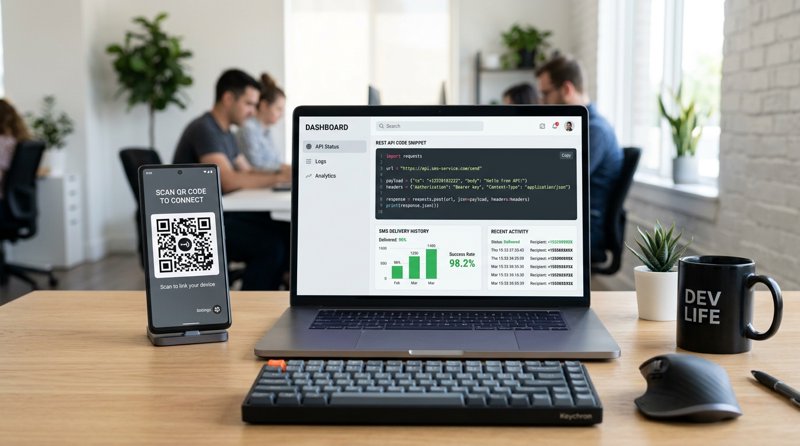
Setting up a reliable system for one-time passwords (OTPs) and operational alerts usually means dealing with expensive gateways, complex carrier registration, and high per-message fees. By building your own SMS OTP server with a SIM and Android phone, you can bypass these hurdles entirely, sending texts directly through your local carrier plan using an API or web dashboard.
The Problem with Traditional SMS Gateways
For small businesses, local clinics, tutoring schools, and indie developers, integrating SMS verification or transactional notifications is a major hurdle. Traditional cloud SMS gateways like Twilio, Plivo, or MessageBird have become increasingly difficult and expensive to use. If you are operating outside the United States, you face exorbitant international SMS rates, often ranging from $0.05 to $0.08 per message. Worse, traditional gateways charge per 160-character segment, meaning a slightly longer message can easily double or triple your costs.
Beyond pricing, regulatory compliance has turned simple SMS integration into a bureaucratic nightmare. Even if you only want to send appointment reminders or OTPs to your own opted-in customer list, you are forced to undergo complex A2P (Application-to-Person) and 10DLC registration, submit business documentation, and wait weeks for carrier approvals. If you fail to comply, your messages are simply blocked. This has led many practical business owners and developers to ask: is there a way to bypass these platforms and build an own sms otp server sim modem setup using hardware they already own?
The True Cost of Traditional A2P SMS Platforms
When analyzing the cost of traditional APIs, businesses often overlook hidden fees. Between monthly phone number rental fees, carrier surcharge fees, and segment-based billing, a seemingly cheap service becomes a major monthly expense. If you send 500 messages a month, a traditional gateway might bill you for 1,000 segments due to character limits or Unicode characters, while also requiring strict compliance audits. Building an independent setup allows you to leverage local SIM cards with flat-rate or unlimited SMS packages, eliminating these middleman markups entirely.
Can an Android Phone with a SIM be Converted into an SMS Server?
The short answer is yes. If you are wondering can an android phone with a sim be converted into a sms server?, the technology is highly accessible and surprisingly stable. Historically, developers who wanted to build an independent SMS gateway had to purchase dedicated GSM USB modems, insert physical SIM cards, connect them to a physical local server, and write complex low-level scripts using AT commands to interact with the cellular network. These setups were notorious for driver conflicts, hardware overheating, and poor reliability.
Today, you can bypass dedicated hardware modems entirely. An Android smartphone is essentially a highly sophisticated, low-power computer with a built-in cellular modem, an operating system, and a native API for sending and receiving text messages. By installing a gateway application, you can easily turn any android phone int sms server that exposes a clean REST API. This allows your backend server to trigger SMS messages that are physically sent by the Android phone using its inserted SIM card.
How the Android SMS Server Architecture Works
The architecture of an Android-based SMS gateway is straightforward. Your web application or backend system makes a standard HTTP POST request to an API endpoint. A cloud-based coordinator (such as MySMSGate) receives this request and instantly routes a push notification to your connected Android phone. The MySMSGate Android app, running in the background, intercepts this instruction and commands the Android operating system to send the SMS via the local SIM card. Because the message originates from a real physical device and a standard consumer SIM, it bypasses A2P carrier filters, ensuring exceptionally high delivery rates to local numbers.
Why Choose an Android Phone Over a Physical USB SIM Modem?
When planning to build sms server with old android phone hardware, it is helpful to compare this approach against traditional physical USB SIM modems (often called GSM gateways). While industrial GSM modems are still sold, they present significant operational challenges for modern small businesses and developers.
| Feature | USB GSM SIM Modem | Android Phone SMS Server (MySMSGate) |
|---|---|---|
| Initial Setup | Complex. Requires physical server, drivers, and serial port configuration. | Simple. Install Android app and scan a QR code from the dashboard. |
| Hardware Reliability | Prone to overheating, disconnection, and driver crashes. | Highly stable. Android handles power management and network handshakes natively. |
| Network Support | Often limited to older 2G/3G bands depending on the modem model. | Full 4G/5G compatibility depending on the phone model. |
| Multi-Device & SIMs | Requires purchasing expensive multi-port hardware. | Connect unlimited phones. Supports Dual SIM configurations out of the box. |
| API Integration | Requires writing custom scripts to parse AT commands or SMS Daemon (smstools). | Standard, developer-friendly REST API (POST /api/v1/send) and webhooks. |
| Non-Technical Use | Command-line only. Virtually impossible for non-technical staff to use. | Beautiful web dashboard with Web Conversations (chat-like interface). |
As the table illustrates, attempting to how can we convert our own android phone to sms server yields a far more reliable, scalable, and user-friendly system than dealing with legacy USB modem hardware.
How to Convert Your Own Android Phone to an SMS Server
If you want to know how can we convert our own android phone to sms server capabilities, the process takes less than five minutes using MySMSGate. You do not need to root your device, install custom ROMs, or write complex low-level code. Follow these actionable steps to get started:
- Create your account: Go to mysmsgate.net and sign up for a free account. You will instantly get access to your API key and a unique connection QR code in your dashboard.
- Install the Android App: Download the MySMSGate APK to your Android device. You can easily build sms server with old android phone hardware, meaning any spare Android device running Android 8 or newer will work perfectly.
- Scan the QR Code: Open the app on your phone and scan the QR code displayed on your web dashboard. This instantly pairs your phone to your account—no manual API key typing required.
- Configure SIM Settings: If your phone supports Dual SIM, you can choose which SIM card to use as the default sender, or manage both slots individually from the web dashboard.
- Start Sending: You can now send messages directly from the Web Conversations dashboard, or integrate the REST API into your backend application to automate OTPs and notifications.
By using MySMSGate, you also benefit from an automatic wake-up feature. Unlike self-hosted solutions that disconnect when the phone enters sleep mode, MySMSGate utilizes high-priority push notifications to wake the device instantly when an SMS needs to be sent.
Using an Old Cell Phone for Server Texting
Many small businesses have old Android devices sitting in drawers. You can easily use old cell phone to send textmessage from my server by wiping the device, connecting it to a stable Wi-Fi network, inserting a cheap local SIM card, and leaving it plugged into a charger in your office. This turns a piece of electronic waste into a powerful, dedicated, low-cost SMS gateway for your clinic, salon, or school.
Connecting and Accessing Your SMS Server via API
Once your Android phone is linked, you can establish access to sms server protocols using a simple REST API. This is ideal for developers building custom OTP systems, user verification flows, or automated booking platforms. If you have been researching sms-gate.app how to set up access sms from server configurations, you will find MySMSGate's API significantly simpler and more robust.
MySMSGate provides a single, clean API endpoint to trigger outbound messages. Here is a practical example of how to send an SMS OTP using a standard cURL request:
curl -X POST https://mysmsgate.net/api/v1/send \
  -H "Authorization: Bearer YOUR_API_KEY" \
  -H "Content-Type: application/json" \
  -d '{
    "to": "+1234567890",
    "message": "Your verification code is: 582194. This code expires in 5 minutes.",
    "sim_slot": 1
  }'
For developers using Python, integrating the SMS server into your backend verification flow requires only a few lines of code:
import requests

def send_otp(phone_number, otp_code):
    url = "https://mysmsgate.net/api/v1/send"
    headers = {
        "Authorization": "Bearer YOUR_API_KEY",
        "Content-Type": "application/json"
    }
    payload = {
        "to": phone_number,
        "message": f"Your secure OTP is {otp_code}. Please do not share this code.",
        "sim_slot": 1
    }

    response = requests.post(url, json=payload, headers=headers)
    return response.json()
With this simple integration, your application can instantly trigger verification codes. For more language examples and integration guides, visit our Android SMS gateway API tutorial.
Real-Time Delivery Tracking via Webhooks
When sending critical OTPs, knowing whether a message was delivered is essential. MySMSGate provides real-time status updates. When your Android phone successfully transmits the SMS to the carrier network, or if the delivery fails (e.g., due to an invalid number or network issue), MySMSGate sends an instant webhook payload back to your server. If a message fails, MySMSGate automatically refunds the transaction balance to your account, ensuring you only pay for successful attempts.
Modern Cloud Bridges vs. Legacy Self-Hosted SMS Servers
When looking for self-hosted options, you might encounter legacy open-source projects like the byhessel sms reserver (often referred to as SMS receiver/server projects) or older tutorials explaining sms-gate.app how to set up access sms from server software. While these DIY projects were valuable in the early days of Android, they suffer from major modern limitations.
First, legacy self-hosted systems require you to expose your local home or office network to the public internet via port forwarding or dynamic DNS so your web application can reach the phone. This introduces significant security vulnerabilities. Second, they lack robust queue management; if your backend sends 50 requests simultaneously, a basic self-hosted script will often crash or drop messages. MySMSGate acts as a highly secure, cloud-hosted bridge. Your server communicates safely with MySMSGate's secure cloud API, which manages message queuing, delivery retries, and webhook distribution, while your Android phone simply executes the sending commands over an encrypted connection.
No Carrier Approval or 10DLC Registration Required
Because the SMS is sent directly from your own SIM card, you are utilizing your personal or business mobile subscription. This means you do not need to register a brand, pay registration fees, or wait for carrier approval. For local service businesses outside the US—such as auto repair shops, dental practices, or driving schools—this is the single fastest and most cost-effective way to send operational notifications. You can read more about how this compares to traditional APIs in our cheapest SMS API guide.
Frequently Asked Questions
Find answers to the most common questions about converting Android devices into local SMS servers.
Can an android phone with a sim be converted into a sms server?
Yes. By installing a gateway application like MySMSGate, your Android phone acts as a cellular modem. The application runs in the background, receives sending instructions from our cloud API, and utilizes the phone's native SIM card to dispatch the text messages locally.
How can we convert our own android phone to sms server?
To convert your phone, simply sign up at MySMSGate, download our Android APK, and scan the QR code in your web dashboard. This establishes a secure link between your phone and our API, allowing you to send and receive messages programmatically or via our web interface.
What is the byhessel sms reserver and how does it compare to modern solutions?
The byhessel sms reserver (and similar open-source SMS receiver projects) are legacy, self-hosted tools. While they allow direct communication with a local Android phone, they lack cloud queuing, secure API routing, real-time webhooks, dual SIM support, and reliable background execution. Modern cloud-bridged gateways like MySMSGate provide a plug-and-play alternative without the security risks of port forwarding.
How do I configure access to sms server for external applications?
With MySMSGate, you gain access to a secure, globally available REST API endpoint. Your external applications can send HTTP POST requests to our cloud servers using your API key. We handle the routing and queue management, delivering the command to your connected Android phone instantly, regardless of where your server is hosted.


Comments (0)
Be the first to comment!