
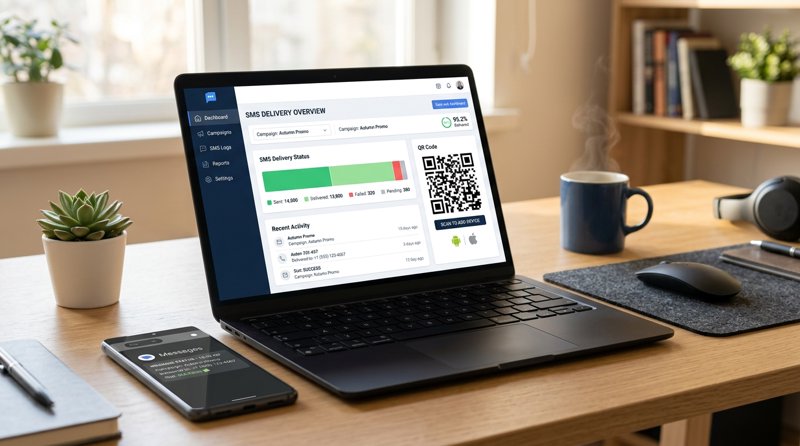
Setting up an android phone as bulk sms sender gateway is the ultimate shortcut for small businesses to send automated notifications without dealing with expensive cloud aggregators. Instead of paying hefty monthly fees or navigating complex carrier approvals, you can turn your own spare mobile device into a powerful, automated messaging hub.
The Problem with Traditional SMS Gateways (Why Android is the Answer)
For small service businesses outside the United States—such as dental clinics, hair salons, tutoring schools, auto repair shops, and local gyms—keeping customers informed is vital. Sending appointment reminders, booking confirmations, and "ready for pickup" alerts directly reduces no-shows and improves customer satisfaction. However, traditional cloud SMS providers like Twilio, Plivo, or MessageBird have made this incredibly difficult and expensive for small operators.
First, traditional gateways charge per 160-character segment. If your reminder message goes slightly over the limit, you are billed double or triple. Second, the industry-wide shift toward strict regulatory compliance—such as A2P 10DLC registration in North America and complex sender ID approvals globally—means small businesses must jump through endless bureaucratic hoops just to send 300 messages a month to their own loyal clients. If you do not have a registered corporate entity, your registration might get rejected entirely, leaving you unable to text your customers.
This is where using an android phone as bulk sms sender gateway becomes a game-changer. By routing messages through your own Android phone and local SIM card, you bypass corporate registry requirements, avoid carrier approvals, and send texts from a local number your customers already recognize. It is the most practical, cost-effective way to manage transactional notifications without the Twilio tax.
The Hidden Costs of Segment Billing
Traditional APIs charge you based on the segment, not the message. If your automated text contains accents, emojis, or personalized fields (like a customer's full name and appointment time), the encoding shifts from GSM-7 to UCS-2. This slashes your character limit per message from 160 to just 70 characters. Suddenly, a single notification is split into three segments, tripling your costs. With an Android-based gateway like MySMSGate, you pay a flat rate of $0.02 per SMS, with no hidden segment surcharges and no monthly contracts.
How an Android Phone SMS Gateway Actually Works
If you are wondering comment fonctionne plate forme de reseau sms android api (how does an Android SMS network platform API work), the architecture is remarkably simple. It bridges the gap between modern web applications and native mobile hardware. Instead of routing your messages through an expensive global telecommunications broker, the system routes them through your physical SIM card.
Here is the step-by-step flow of how MySMSGate handles your messages:
- The Trigger: Your booking system, CRM, or custom script triggers an outbound message. This can be done via a simple REST API or a no-code integration like Zapier.
- The Gateway Cloud: MySMSGate receives the request and immediately pushes a silent notification to your connected Android phone.
- The Android App: The lightweight MySMSGate Android app wakes up instantly, reads the payload, and instructs your phone's native operating system to send the SMS using your local SIM card.
- The Delivery: The message is sent through your local mobile carrier. To your customer, it looks exactly like a standard text message coming from your business's mobile number.
- The Sync: Any replies from your customers are automatically forwarded back to your web dashboard, allowing you to have real-time, two-way conversations from your computer.
Will This Work with Google Voice or Virtual Numbers?
A common question among small business owners is: will sms gateway for android work with google voice? The short answer is no. Virtual VoIP platforms like Google Voice do not allow direct hardware-level integration for SMS routing. An Android SMS gateway relies on physical SIM cards (or eSIMs) installed in your physical Android device. This is actually a major benefit: physical SIM cards have significantly higher delivery rates to local mobile networks compared to virtual numbers, which are frequently flagged and blocked by carriers as spam.
Technical Deep Dive: Encoding, Character Limits, and Formatting
When setting up your gateway, understanding how mobile operating systems handle text data is crucial for ensuring your messages arrive exactly as intended.
Two major technical factors dictate how your texts are processed:
- Character Encoding: Understanding encoding types on for sms messages android is the key to avoiding broken characters. Standard messages use GSM-7 encoding, which supports basic Latin characters. If you send messages containing non-English alphabets, special symbols, or emojis, the gateway must handle utf8 format et android format caractères properly. MySMSGate handles this conversion seamlessly behind the scenes, ensuring your French accents, Spanish tildes, or Arabic scripts render perfectly on the recipient's device.
- Message Length: You might wonder: can i text android over certain characters? will they receive it? Yes. Modern Android devices and carriers support Concatenated SMS. If your message exceeds the standard limit, the gateway splits it, and the recipient's phone automatically reconstructs it into a single, seamless text block. While other APIs charge you for every single segment of that split message, MySMSGate charges you one flat fee per message.
Satellite Messaging and Future Tech
While modern Android versions explore advanced features like satellite messaging (such as android 发生卫星短信api for emergency off-grid communication), local businesses simply need reliable, cost-effective cellular routing for day-to-day notifications. Utilizing your existing 4G/5G mobile connection ensures instant delivery at a fraction of the cost of satellite or specialized enterprise routes.
Step-by-Step Tutorial: Setting Up Your Android SMS Gateway
Setting up your own gateway takes less than five minutes. This android-sms-gateway tutorial will walk you through the entire process, whether you are a non-technical business owner or a developer integrating our REST API.
Follow these simple steps to get started:
Step 1: Create Your Free Account
Navigate to the MySMSGate registration page and sign up. There are no setup fees, no monthly subscriptions, and you do not need a credit card to get started. You will instantly receive access to your web dashboard, which contains your unique API key and connection QR code.
Step 2: Install the Android App
Instead of searching for complex APK links or asking please send my gateway app to my phone number android, simply download the lightweight MySMSGate APK directly from your dashboard. Install it on any Android device running Android 5.0 or higher. You can use an active phone or an old, spare Android device connected to Wi-Fi with a local SIM card installed.
Step 3: Scan the QR Code to Connect
Open the MySMSGate app on your Android phone and tap "Scan QR Code". Point your phone's camera at the QR code displayed on your desktop dashboard. Your device is now securely paired with your account. The app includes an auto wake-up feature via push notifications, ensuring it stays connected and ready to send messages even when the phone is in sleep mode.
Step 4: Send Your First Message
You can now send messages directly from the Web Conversations dashboard or trigger them programmatically. If you are a developer, you can send an SMS with a single POST request:
curl -X POST https://mysmsgate.net/api/v1/send \
  -H "Authorization: Bearer YOUR_API_KEY" \
  -H "Content-Type: application/json" \
  -d '{
    "to": "+1234567890",
    "message": "Your appointment is confirmed for tomorrow at 10:00 AM."
  }'
For more code examples, check out our comprehensive Android SMS gateway tutorial.
No-Code Bulk SMS: Spreadsheets and Automations
You do not need to be a software engineer to harness the power of an Android SMS gateway. Many non-technical business owners ask como conectar uma planilha ao aplicativo mensagens sms do android? (how to connect a spreadsheet to the Android SMS messaging app) to send bulk notifications to their customer lists.
With MySMSGate, you can easily automate your outreach without writing a single line of code:
- Zapier and Make.com Integrations: You can link your Google Sheets, Airtable, or CRM directly to MySMSGate. Whenever a new row is added to your spreadsheet (e.g., a new customer booking), a personalized SMS is automatically triggered and sent through your Android phone.
- Web Conversations: If you want to send manual campaigns or reply to incoming messages, you can do it all from your web browser. MySMSGate features a chat-like interface that lets you manage conversations across multiple connected devices and SIM cards in one unified dashboard. If you are wondering comment envoyer des campagnes sms sans utiliser de code ? (how to send SMS campaigns without code), this web-based dashboard is your complete solution.
Comparing MySMSGate with Traditional SMS Providers
When deciding on the best setup for your business, comparing the costs and requirements of different platforms is essential. Below is a realistic comparison of MySMSGate against traditional aggregators and other Android-based gateways.
| Feature / Cost | MySMSGate | Twilio / Plivo | SMSGateway.me |
|---|---|---|---|
| Cost per SMS | $0.02 flat rate | $0.05 - $0.08 + segment fees | Requires monthly subscription ($9.99/mo) |
| Monthly Fees | $0.00 (Pay-as-you-go) | $0.00 (But high usage minimums apply) | $9.99/month minimum |
| 10DLC / Carrier Registration | Not Required | Strictly Required (High fees & delays) | Not Required |
| Sender ID | Your own mobile number | Leased virtual number ($1-$5/mo) | Your own mobile number |
| Multi-Device Support | Yes (Unlimited phones) | No (Virtual numbers only) | Limited by plan |
| Failed SMS Refund | Yes (Auto-refunded) | No (Charged regardless of delivery) | No |
As shown in the table, MySMSGate offers a highly competitive option for small businesses that want to maintain a direct relationship with their customers. By choosing a pay-as-you-go structure with a low $5.00 entry point (250 SMS), you only pay for what you actually use. Read our cheapest SMS API guide to see how much your business can save.
Frequently Asked Questions
Find answers to the most common questions about setting up and operating an Android-based bulk SMS gateway.
Can I use dual SIM cards with an Android SMS gateway?
Yes. MySMSGate fully supports dual SIM Android phones. From your web dashboard or via the REST API, you can specify exactly which SIM slot (SIM 1 or SIM 2) should be used to send each message. This is perfect for separating business and personal lines on a single device, or using different carriers to optimize local rates.
What happens if my phone goes to sleep or loses Wi-Fi connection?
The MySMSGate Android app is optimized to run reliably in the background. It utilizes native push notifications to automatically wake up the phone whenever a new message is queued. If the phone temporarily loses internet connectivity, messages are safely queued in the cloud and sent automatically as soon as the device reconnects.
Are there any carrier rules or registration requirements like 10DLC?
No. Because you are sending messages through your own physical SIM card, your traffic is treated as standard person-to-person (P2P) messaging by the mobile carriers. You do not need to register for A2P 10DLC, undergo identity verification, or wait weeks for carrier approval. You can start sending messages immediately after setup.
How does MySMSGate handle failed messages?
If a message fails to send—for example, if the recipient's phone number is invalid or your Android device is offline—MySMSGate automatically detects the failure and refunds the cost of that specific SMS back to your account balance instantly.
Can I integrate this with my backend API for OTPs and validation rules?
Absolutely. Developers looking for the best apis for triggering outbound calls and sms from backend rest api can easily integrate MySMSGate. It supports secure integración sistema android envío mensajes validación reglas (Android system integration sending validation messages rules) to handle one-time passwords (OTPs), verification codes, and automated system alerts directly from your backend application using our simple REST API.


Comments (0)
Be the first to comment!