
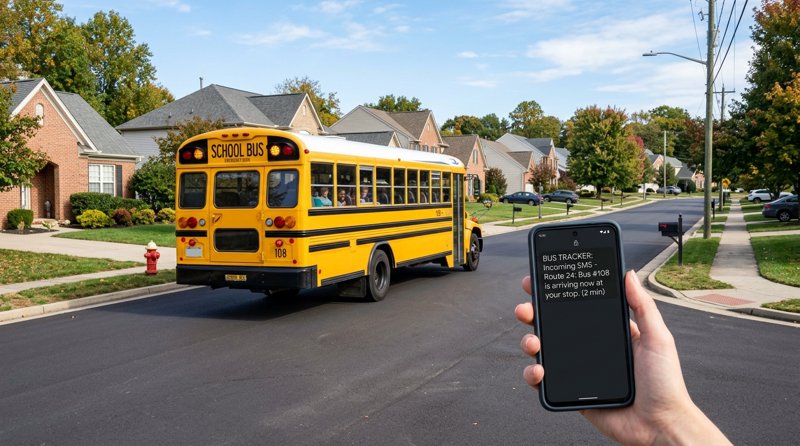
Managing school transportation comes with a unique set of challenges, especially when parents are left waiting in the dark about pickup and drop-off times. If you operate a private school, tutoring center, or language academy, finding efficient ideas in how to announce the arriving of each bus to school can dramatically improve safety and parent satisfaction. In this guide, we will explore practical, automated, and cost-effective ways to notify parents exactly when the school bus is arriving.
Why SMS is the Best Channel for School Bus Announcements
When brainstorming ideas in how to announce the arriving of each bus to school, many administrators immediately think of building a custom mobile app or using GPS tracking platforms. However, native mobile apps present significant friction: parents must download them, keep their data turned on, and bypass strict battery-saver settings that often block push notifications. WhatsApp groups quickly turn chaotic with off-topic chatter and spam.
SMS remains the most reliable communication channel. It boasts an open rate of over 98%, requires no internet connection on the recipient's phone, and works on every mobile device instantly. By using an automated SMS gateway, you can send real-time coordinates or simple proximity alerts directly to a parent's messaging inbox, ensuring they never miss a notification.
Step 1: Choose Your Announcement Trigger Strategy
Before writing code or buying hardware, you must decide how the arrival event will be triggered. There are two primary methods to initiate the announcement:
- Geofencing (Automated): A GPS tracker installed on the bus triggers an API request when the vehicle crosses a virtual boundary (e.g., 2 kilometers away from a designated stop).
- Manual Dispatch (One-Click): The bus driver or a transport coordinator taps a button on a simple mobile dashboard when they are nearing a stop, triggering a pre-formatted message to all parents assigned to that route.
For most small-to-medium schools, starting with a manual dispatch system or a simple low-code integration is the fastest and most budget-friendly approach.
Step 2: Set Up Your SMS Gateway Infrastructure
To send automated messages without paying exorbitant carrier fees, you need a reliable SMS gateway. Traditional APIs like Twilio or Plivo require complex A2P 10DLC brand registration, monthly phone rental fees, and charge per 160-character segment, which quickly inflates your monthly bill.
Instead, you can use MySMSGate to turn a spare Android phone at your school's front desk into a dedicated SMS gateway. By using a local SIM card with an unlimited texting plan, you bypass carrier approvals, avoid international delivery surcharges, and send messages from a local number that parents already recognize. Best of all, MySMSGate charges a flat rate of $0.02 per message with no monthly fees, and there is no extra charge for long messages.
To get started, register an account, install the MySMSGate Android app on your designated device, and scan the QR code in your dashboard to link the phone instantly. For more details on this approach, read our guide on how to send SMS from an Android phone via API.
Step 3: Connect Your GPS Tracker to the SMS API
If you choose the automated geofencing route, you can connect your GPS hardware to MySMSGate's simple REST API. Whenever the bus enters the geofenced zone, your backend server can trigger a POST request to send the alert.
Here is a simple Python example demonstrating how to send an arrival notification using the MySMSGate API:
import requests

url = "https://mysmsgate.net/api/v1/send"
headers = {
    "Authorization": "Bearer YOUR_API_KEY",
    "Content-Type": "application/json"
}
payload = {
    "to": "+1234567890",
    "message": "School Bus Route A is 5 minutes away from your stop. Please prepare for pickup.",
    "device_id": "your_device_id_here"
}

response = requests.post(url, json=payload, headers=headers)
print(response.json())
For developers looking to build this out, check our complete API documentation for integration templates in Node.js, PHP, Go, and Ruby.
Step 4: Implement Low-Code Ideas in How to Announce the Arriving of Each Bus to School
You do not need to be a software engineer to build an automated announcement system. By combining MySMSGate with no-code automation platforms like Make.com, Zapier, or n8n, you can create a fully functional notification system in under an hour.
Here is a practical workflow you can set up today:
- Create a shared Google Sheet for your transport coordinators.
- Add columns for: Route Name, Stop Name, Estimated Arrival, and Parent Phone Numbers.
- Set up a scenario in Make.com that watches for changes in this sheet.
- When a coordinator updates the status of a route to "Arriving", Make.com automatically pulls the parent phone numbers for that route and sends the personalized SMS alerts via MySMSGate.
This approach gives your staff complete control without requiring any coding knowledge, making it one of the most accessible ideas in how to announce the arriving of each bus to school.
Step 5: Draft Clear and Actionable SMS Templates
The content of your announcement must be concise, clear, and actionable. Parents need to know exactly which bus is arriving, where, and when. Here are a few highly effective templates you can adapt for your school:
- Proximity Alert: "Hi [Parent Name], School Bus [Route] is approximately 5 minutes away from [Stop Name]. Please make sure someone is ready at the stop."
- Delayed Bus Notification: "Alert: School Bus [Route] is experiencing traffic delays of roughly 15 minutes. We apologize for the inconvenience."
- Safe Arrival at School: "Update: Bus [Route] has arrived safely at the school campus at [Time]. Have a great day!"
- Substitutions: "Notice: Today, Route B will be serviced by Bus #[Number]. The schedule remains unchanged."
Comparing Notification Solutions for Schools
When evaluating different ideas in how to announce the arriving of each bus to school, it helps to compare the costs, setup complexity, and reliability of each major approach.
| Feature | Custom School App | Twilio / Standard API | MySMSGate (Android Gateway) |
|---|---|---|---|
| Setup Cost | High ($5,000+) | Low (Pay-per-use) | Very Low ($5 minimum) |
| Monthly Fees | High (Maintenance) | Yes (Number rentals) | $0.00 |
| Carrier Approval (10DLC) | N/A | Required (Weeks of waiting) | Not Required |
| Message Cost | Free (Push) | $0.05 - $0.08 / segment | $0.02 flat (Any length) |
| Deliverability | Medium (Depends on internet) | High | High (Uses local SIM) |
As shown in the table, using an Android-based gateway provides the perfect middle ground: you get the reliability of SMS without the high costs and bureaucratic headaches of traditional telecom providers. For a deeper look at pricing comparisons, see our analysis of the cheapest SMS API for small businesses.
Frequently Asked Questions
Find answers to common questions about setting up school bus notification systems using SMS gateways.
How do I send automated school bus arrival notifications?
You can automate notifications by linking a GPS tracker on the bus to an SMS API. When the bus crosses a designated geofence, the system sends an API request to a gateway like MySMSGate, which instantly delivers a text message to the parents assigned to that route.
What is the cheapest way to send SMS alerts to parents?
The most cost-effective method is using an Android SMS gateway. Instead of paying per-message segment fees to legacy providers, you can use a local SIM card with an unlimited texting plan and route the messages through MySMSGate for a flat rate of $0.02 per message with no monthly fees.
Do parents need to install an app to receive school bus updates?
No. By using SMS-based notifications, parents receive real-time updates directly on their native messaging app. This ensures 100% compatibility across all mobile devices without requiring any downloads or active internet connections.


Comments (0)
Be the first to comment!