
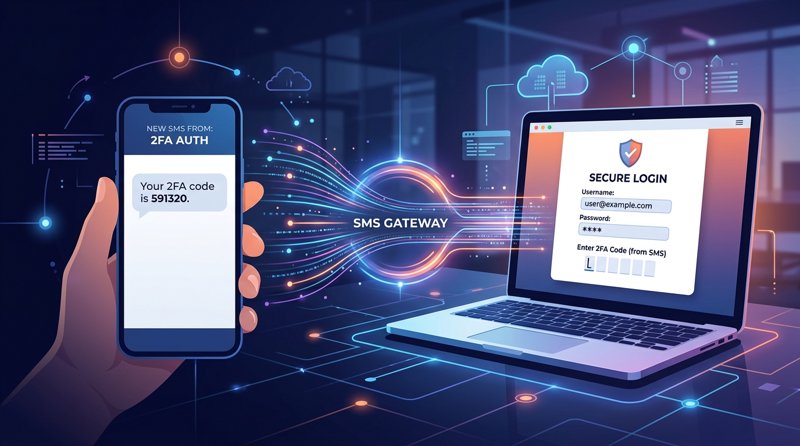
Two-factor authentication (2FA) is a necessity for online security today, protecting accounts from unauthorized access. Understanding how an SMS gateway for two-factor authentication works is crucial for anyone looking to effectively protect user data. This article explores the mechanisms, benefits, and implementation of SMS gateways for 2FA, focusing on solutions like MySMSGate.
What is Two-Factor Authentication (2FA) and Why Do We Need It?
Two-factor authentication, often abbreviated as 2FA, represents a security layer that requires two different forms of identification before granting access to an account. Instead of just entering a username and password, which is one form of authentication (something you know), 2FA adds a second factor – usually something you have (e.g., a phone) or something you are (e.g., a fingerprint).
The main reason for implementing 2FA is to increase security. Passwords can be stolen, cracked, or guessed. Even if an attacker obtains your password, they cannot access the account without the second factor. Common second-factor methods include:
- SMS codes (OTP - One-Time Password): A one-time code sent to a registered phone number.
- Authentication apps: Codes generated by apps like Google Authenticator or Authy.
- Biometric data: Fingerprint, facial recognition.
- Hardware tokens: Physical devices that generate codes.
Of these methods, SMS 2FA is one of the most widespread and accessible because it doesn't require installing special apps and works on any mobile phone capable of receiving SMS.
How Does an SMS Gateway Work in the Context of 2FA?
An SMS gateway is a bridge between your application or service and users' mobile phones. In the context of 2FA, it plays a key role in delivering one-time passwords (OTP). The process works as follows:
- Login Request: The user enters their username and password into a website or application.
- OTP Generation: If the login credentials are correct, the application server generates a unique, time-limited OTP code.
- Sending the Request to the SMS Gateway: The application server sends this OTP code along with the user's phone number to the SMS gateway (usually via an API for sending SMS).
- SMS Delivery: The SMS gateway receives the request and sends an SMS message containing the OTP code to the user's mobile phone. In this step, MySMSGate uses a connected Android phone with a local SIM card, ensuring high deliverability and bypassing traditional, often slower and more expensive, carrier routes.
- User Enters OTP: The user receives the SMS and enters the OTP code back into the application or website.
- Verification: The application server verifies the entered OTP code. If it is correct, the user is granted access.
This system ensures that even if someone gets the password, they still need physical access to the user's phone to log in. Therefore, an efficient api for sending sms is essential for reliable 2FA.
Why is SMS Gateway Reliability Crucial for 2FA?
SMS gateway reliability is absolutely critical for the functionality of 2FA. Slow or undelivered OTP codes can lead to:
- User Frustration: Users cannot access their accounts, leading to a negative experience and potential customer loss.
- Security Risks: If users cannot log in using 2FA, they may seek less secure alternatives or even stop using it altogether.
- Loss of Trust: An unreliable security system undermines trust in the entire service.
Traditional SMS gateways often struggle with issues such as variable delivery times, carrier filters, or regional restrictions. MySMSGate avoids this by using your own Android phones as local SMS gateways. Each message is sent directly from the SIM card in the phone, which dramatically increases delivery reliability and reduces latency. Furthermore, thanks to this approach, MySMSGate avoids complex and costly regulations like 10DLC in the USA, which can be a significant barrier for small businesses and startups.
Implementing 2FA with MySMSGate: Fast and Cost-Effective
MySMSGate offers a robust and affordable solution for implementing SMS 2FA for both developers and non-technical users. Unlike expensive and complex platforms like Twilio (which costs $0.05-$0.08/SMS plus monthly fees) or SMSGateway.me ($9.99/month), MySMSGate offers transparent pricing starting at just $0.03/SMS without any monthly fees or contracts.
For Developers: Integration via REST API
If you are developing an application and need to send OTP codes programmatically, MySMSGate provides a simple and well-documented REST API. Integration is fast and intuitive, with a single key endpoint for sending SMS. Code examples are available for popular languages like Python, Node.js, PHP, Go, and Ruby, as well as integrations with automation platforms like Zapier, Make.com, and n8n.
Here is an example of how to send an SMS using the MySMSGate API in Python:
import requests

api_key = "Your_API_Key"
phone_id = "ID_of_phone_to_send_from"
recipient_number = "+420777123456"
message_text = "Your verification code is: 123456"

url = "https://mysmsgate.net/api/v1/send"
headers = {
    "Content-Type": "application/json",
    "Authorization": f"Bearer {api_key}"
}
data = {
    "phone_id": phone_id,
    "number": recipient_number,
    "message": message_text
}

response = requests.post(url, headers=headers, json=data)

if response.status_code == 200:
    print("SMS successfully sent!")
    print(response.json())
else:
    print(f"Error sending SMS: {response.status_code}")
    print(response.json())
To track delivery status, you can use webhooks, which provide real-time information on whether the message was delivered, failed, or is still in the queue. This is key for a reliable 2FA implementation. MySMSGate thus becomes a great alternative to Twilio for developers looking for a cost-effective and reliable solution.
For Non-Technical Users and Small Businesses: SMS Gateway Without Coding
Not everyone has a developer available or needs a fully automated API. MySMSGate is designed to be accessible even for small businesses and freelancers who need to manage SMS communication, including 2FA-like situations (e.g., manually sending verification codes to customers or booking confirmations).
- Web Conversations: Use an intuitive chat interface in your browser to send and receive SMS messages directly from your computer. You can thus manually send OTP codes or confirmation messages.
- Multi-device Support: Connect an unlimited number of Android phones to one account. Each branch can have its own phone and SIM card, all managed from one central panel.
- Dual SIM Support: On any connected phone, you can use both SIM cards and choose which one to send the message from.
- QR Code Setup: Connecting a phone is a breeze – just scan the QR code from your web panel and the phone is instantly connected. No complex API keys or manual configuration.
- SMS Reception: All received messages are automatically forwarded to your web panel, ensuring a complete overview of communication.
This flexibility makes MySMSGate an ideal solution for companies that need a reliable SMS gateway without the need for coding, making it a great choice for those looking for the cheapest SMS API for small business.
Key Benefits of Using MySMSGate for 2FA and Other SMS Services
MySMSGate offers a range of benefits that set it apart from the competition and make it an ideal choice for 2FA and other SMS communication needs:
- Unbeatable Price: No monthly fees, no contracts. You only pay for sent SMS, starting from $0.03 per message. Packages start at 100 SMS for $3, 500 SMS for $12, 1000 SMS for $20.
- High Reliability and Deliverability: By using local SIM cards in your Android phones, messages are delivered directly, bypassing potential problems of traditional SMS gateways and ensuring almost instant delivery of OTP codes.
- No Sender Registration (No 10DLC): Avoid complex and expensive sender registration processes that are mandatory for commercial SMS in some countries (e.g., USA). With MySMSGate, you send from a real phone number, which is ideal for 2FA.
- Simple Setup and Use: Quick phone connection via QR code and intuitive web panel for management.
- Auto Wake-up: The phone remains connected and ready to send messages even in sleep mode thanks to push notifications.
- Refunds for Failed SMS: If an SMS fails to deliver for any reason, your credit is automatically returned.
- SMS App Included: The Android app also functions as a full-featured SMS messenger, increasing its utility.
- Flexibility: Support for multiple devices and Dual SIM for maximum customization to your needs.
Whether you are an indie developer, a startup, or a small business, MySMSGate provides a robust and economical solution for your SMS communication, including the critical function of two-factor authentication.
Frequently Asked Questions (FAQ)
Is SMS 2FA still secure?
Yes, SMS 2FA is still considered a significant improvement over a password alone. Although advanced attacks like SIM swapping or phishing exist that target SMS 2FA, it provides a sufficient level of security for most users and applications. However, it is always good to combine 2FA with other security practices and consider stronger methods for highly sensitive accounts if possible.
How much does it cost to send SMS for 2FA with MySMSGate?
MySMSGate offers very competitive pricing without monthly fees. The price per SMS starts at $0.03. You can purchase packages like 100 SMS for $3, 500 SMS for $12, or 1000 SMS for $20. You only pay for messages actually sent, and if a message fails, the credit is automatically returned to you.
Do I need technical knowledge to implement an SMS gateway?
For a fully automated 2FA implementation with MySMSGate via the REST API, technical knowledge (especially programming) is necessary. However, for smaller businesses or manual SMS sending (including OTP codes), you can use the user-friendly MySMSGate web panel, which requires no coding. Just connect your phone via QR code and you can immediately start sending and receiving messages.
How fast are SMS for 2FA delivered?
Thanks to MySMSGate's unique approach of using your own Android phones to send messages directly via local SIM cards, SMS delivery for 2FA is almost instantaneous. This minimizes latency and ensures a smooth user experience, which is critical for two-factor authentication.
Can MySMSGate function as an 'android app sms api'?
Yes, exactly! MySMSGate effectively turns your Android phone into a robust SMS API endpoint. After installing our app and linking it to your account, your phone becomes part of our SMS gateway, allowing you to send and receive SMS programmatically via our API, as well as from the web panel. It is an ideal solution if you are looking for a way to use an 'android app sms api' for your projects.


Comments (0)
Be the first to comment!