
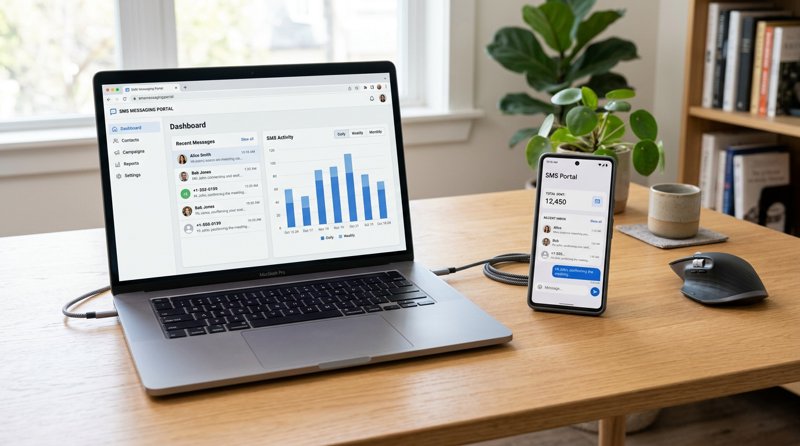
In today's business world, direct and reliable communication is crucial. A private SMS chat for business allows you to connect personally and efficiently with customers, partners, and employees without the high costs or complexity of traditional SMS services. MySMSGate offers an innovative solution that transforms your Android phones into powerful SMS gateways, giving you full control over your communication.
Why a Private SMS Chat is Essential for Business
The ability to communicate directly and personally with your target audience is a massive advantage. A private SMS chat goes beyond generic bulk SMS and enables a real two-way conversation that builds trust and strengthens customer loyalty. For many companies, having their own SMS chat is not just a luxury, but a necessity.
Traditional communication channels like email struggle with low open rates, while SMS boasts an open rate of nearly 98%. This makes SMS the ideal channel for important notifications, appointment confirmations, customer support, and even marketing campaigns. With MySMSGate, you use your own SIM cards, which means:
- No expensive monthly fees: You only pay for the SMS you send.
- No sender registration: No more 10DLC registrations or carrier approvals. You send from your existing phone number.
- Full control: You decide which number and which device your messages are sent from.
- Increased deliverability: Messages are treated as personal SMS, which often improves delivery rates compared to A2P services.
Traditional SMS Gateways vs. MySMSGate: A Cost and Feature Comparison
Before we dive into the details of how to set up a private SMS chat, it's important to understand the alternatives. Many established SMS APIs like Twilio, MessageBird, or Vonage offer powerful services but often come with high costs, complex registration processes (especially 10DLC in the USA), and less flexibility for small businesses or startups.
MySMSGate takes a different approach: we use your existing Android phones as a bridge to mobile networks. This eliminates many of the regulatory hurdles and costs associated with traditional A2P SMS services. Here is a direct comparison:
| Feature/Service | MySMSGate | Traditional SMS APIs (e.g., Twilio) |
|---|---|---|
| Cost per SMS | From $0.03/SMS (no monthly fees) | From $0.05-$0.08/SMS + monthly fees for numbers |
| Monthly Fees | None | Often $1-$5 for each rented number |
| 10DLC/Sender Registration | Not required (uses your SIM card) | Mandatory for A2P SMS in the USA, complex and expensive |
| Setup Complexity | Very simple (QR code scan) | API keys, authentication, number rental |
| Web Dashboard for Chat | Yes, Web Conversations | Often API-only, requires custom UI development |
| Multi-Device Support | Unlimited Android phones | Each number must be rented separately |
| Deliverability | Very high (as P2P SMS) | High, but can be affected by carrier filters |
| Target Audience | SMEs, freelancers, startups, developers | Large enterprises, developers |
As you can see, MySMSGate offers a cost-effective and straightforward alternative to Twilio and other providers, especially for small businesses and startups looking to implement a private SMS chat without getting lost in technical details or carrying high recurring costs.
Step 1: Create a MySMSGate Account and Connect Android App
The first step to building your private SMS chat is incredibly simple and requires no technical prior knowledge.
- Create an account: Visit mysmsgate.net and click on "Get started free". Registration is fast and uncomplicated. After logging in, you will receive your personal API key and a unique QR code in your dashboard.
- Install MySMSGate Android App: Download the MySMSGate app from the Google Play Store onto your Android phone. The app is lightweight and secure.
- Connect phone: Open the MySMSGate app on your phone and scan the QR code displayed in your MySMSGate web dashboard. The connection is established instantly – no manual entry of API keys or complex configurations required!
- Optional: Connect more phones: If you run a multi-branch business or want to use multiple numbers, you can connect as many Android phones as you like to your MySMSGate account. Each phone can be managed via the dashboard.
Your phone is now an active part of your private SMS gateway. It stays connected to the server via push notifications even when in sleep mode, and is ready to send or receive messages at any time.
Step 2: Send and Receive SMS Messages via Web Dashboard (for Non-Techies)
For non-technical users, MySMSGate offers an intuitive web dashboard that works like a chat client. This allows you to manage your private SMS chat directly from your computer.
- Web Conversations: After logging in, you will find the "Conversations" section in the dashboard. Here you can start new SMS conversations or reply to incoming messages. The interface is designed to feel like a typical messenger.
- Select Device and SIM Slot: If you have connected multiple phones or dual-SIM devices, you can easily select which device and which SIM slot the SMS should be sent from before sending each message. This is ideal for businesses with different regional numbers or departments.
- Automatically Receive Incoming SMS: All SMS sent to your connected phones are automatically forwarded to your MySMSGate dashboard. You won't miss a message and can manage all communications centrally.
- Full Overview: The dashboard provides a clear overview of all sent and received messages, their status, and the devices involved.
This functionality is perfect for small businesses, freelancers, or customer service teams who need a simple but powerful solution for their SMS traffic without having to write code.
Step 3: Integrate SMS Sending via REST API (for Developers)
For developers and startups, MySMSGate offers a simple and powerful REST API to integrate private SMS chat into existing applications or workflows. This is the perfect solution for automating SMS notifications, OTPs, or marketing campaigns. Our API is designed to make setting up an Android SMS Gateway as easy as possible for developers.
Simple REST API
The MySMSGate API is kept extremely simple and requires only a single endpoint to send messages:
POST /api/v1/sendYou simply send a POST request with the recipient information and your message.
Code Example (cURL)
A basic example of sending an SMS with cURL:
curl -X POST \
  https://mysmsgate.net/api/v1/send \
  -H 'Content-Type: application/json' \
  -H 'Authorization: Bearer YOUR_API_KEY' \
  -d '{
    "to": "+4917612345678",
    "message": "Hello from MySMSGate!",
    "device_id": 123,
    "sim_slot": 0
  }'
Replace YOUR_API_KEY, +4917612345678, 123, and 0 with your actual values. The parameters device_id and sim_slot are optional if you only use one device/SIM slot.
Delivery Tracking and Webhooks
Track the status of your sent messages in real-time via your dashboard or set up webhooks to receive automatic notifications about delivery status (sent, delivered, failed) directly to your system. This is crucial for critical notifications like OTPs or appointment confirmations.
Integrations
MySMSGate is more than just an API for developers. We also offer seamless integrations with popular automation platforms like Zapier, Make.com, and n8n. This allows you to integrate SMS functions into thousands of apps and services without writing a single line of code. This makes MySMSGate one of the best communication APIs for startups and businesses looking to scale quickly.
Advantages of a Private SMS Chat with MySMSGate in Daily Business
Implementing a private SMS chat for your business with MySMSGate offers a multitude of benefits that go beyond simple messaging:
- Cost Efficiency: With prices starting at $0.03 per SMS and no monthly fees, MySMSGate is one of the most affordable SMS APIs for small businesses. You only pay for what you actually use, and you even get an automatic refund for failed SMS.
- Data Privacy and Control: Since you use your own SIM cards, you retain full control over your data and don't have to worry about it being shared with third parties. Your communication remains private.
- Scalability for Multi-Branch Businesses: Connect unlimited Android phones. For example, a company with five branches can manage five phones – and thus five local numbers – via a single MySMSGate dashboard. This significantly simplifies communication.
- No Regulatory Hurdles: Bypass complex and costly registration processes like 10DLC required for traditional A2P services.
- Versatile Use Cases:
- Appointment Reminders: Reduce no-shows through automatic SMS reminders.
- Customer Support: Provide fast and direct support via your customers' preferred communication channel.
- Marketing Campaigns: Send targeted offers or updates to your customers.
- Two-Factor Authentication (2FA/OTP): Implement secure login procedures.
- User-Friendliness: Whether via the web dashboard for non-techies or the robust API for developers – MySMSGate is designed to be simple and efficient.
MySMSGate enables you to build a powerful and flexible SMS communication channel that integrates seamlessly into your existing workflows and helps you achieve your business goals.
Frequently Asked Questions (FAQ)
A private SMS chat, as enabled by MySMSGate, uses your own Android phones and SIM cards to send and receive messages. This means that messages are sent from a phone number you own and are treated as personal (P2P) SMS. Standard SMS services (A2P - Application-to-Person) often use rented numbers and are more expensive, frequently require extensive registrations (e.g., 10DLC), and can be more heavily affected by carrier filters.
MySMSGate places a high value on security and data protection. All communication between the Android app, your dashboard, and our servers is encrypted. Since you use your own SIM cards, you retain full control over your phone numbers and communication data. We only store the necessary metadata for the delivery and status tracking of your messages.
Yes, absolutely! MySMSGate is ideal for businesses with multiple locations. You can connect an unlimited number of Android phones to your account. Each phone can represent a different local number, and you can choose which device and SIM slot to send a message from in the web dashboard or via the API. This allows you to manage SMS communication for all your locations centrally.
MySMSGate offers a transparent, usage-based pricing model with no monthly fees or contracts. You only pay for the SMS actually sent, starting at $0.03 per SMS. There are various SMS packages available (e.g., 100 SMS for $3, 500 SMS for $12, 1000 SMS for $20) that you can purchase as needed. Your balance is automatically refunded for failed SMS.
No, not necessarily. For non-technical users, MySMSGate provides a user-friendly web dashboard with a "Web Conversations" interface that works like a chat. Setting up the Android app is done easily via a QR code scan. However, if you want advanced automation or integration into existing systems, a simple REST API is available that is easy for developers to use. There are also integrations with tools like Zapier, Make.com, and n8n that often require no programming knowledge.


Comments (0)
Be the first to comment!