
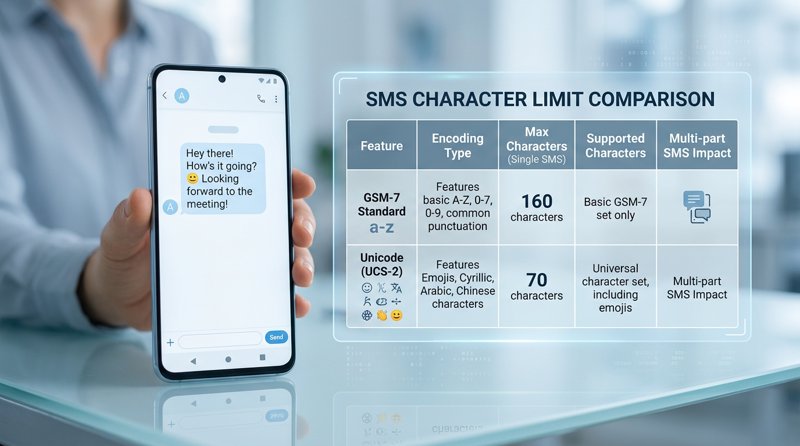
When building automated systems or sending customer notifications, many business owners and developers are shocked to find their monthly SMS bills are twice as high as expected. This comprehensive guide provides a table with the number of chars that special char need to send sms, helping you understand how hidden encoding shifts can drastically inflate your messaging costs.
Why Special Characters Change SMS Length and Cost
In telecom standards, text messages are not billed by the raw number of words you write, but by "segments." A standard SMS segment is encoded using the GSM-7 character set, which allows up to 160 characters per message. However, the moment you introduce a single character outside this standard set—such as an emoji, a Cyrillic letter, or even a fancy "smart quote" copied from Microsoft Word—the entire message encoding shifts to UCS-2 (Unicode).
Under UCS-2 encoding, sms messages are limited to 160 characters, even when they include special characters and emojis is a common misconception. In reality, once a single non-GSM character is detected, the maximum character limit per segment drops instantly from 160 characters to just 70 characters. If your message is 71 characters long and contains one emoji, it will be split and billed as two separate SMS segments by traditional API providers like Twilio or Plivo.
Understanding what special carachters usually affect messages is crucial for keeping your operational costs low, especially if you are running a local service business like a clinic, salon, or repair shop sending appointment reminders to your customers.
GSM-7 vs. UCS-2 Encoding Explained
GSM-7 is an 7-bit character encoding standard designed specifically for SMS. It contains most Latin characters, numbers, and basic punctuation. UCS-2 is a 16-bit encoding standard that can represent almost any character in any language, including emojis, but it requires double the data per character. This data overhead is why carrier networks drop the segment capacity to 70 characters when UCS-2 is triggered.
The Ultimate SMS Special Character Mapping Table
Below is a table with the number of chars that special char need to send sms. This table outlines standard GSM-7 characters, GSM-7 Extended characters (which require 2 character spaces within the 160-limit), and UCS-2 characters that force the strict 70-character limit.
| Character Category | Example Characters | Bits per Character | Character Weight in SMS | Max Segment Limit |
|---|---|---|---|---|
| GSM-7 Basic | A-Z, a-z, 0-9, spaces, simple punctuation (., !, ?, @, $, etc.) | 7 bits | 1 character | 160 characters |
| GSM-7 Extended | ^, {, }, [, ], ~, |, \, € | 14 bits | 2 characters | 160 characters (each extended char counts as 2) |
| UCS-2 (Unicode) | á, í, ó, ñ, ’ (smart quote), emojis (😀), Cyrillic, Arabic | 16 bits | Forces entire message to Unicode | 70 characters |
As shown in the table, using an extended GSM-7 character like a curly bracket "{" or a backslash "\" doesn't force Unicode, but it does count as two characters against your 160-character limit. However, using a non-GSM character like "á" (often used in Spanish sms y caracteres especiales configurations) or a curly apostrophe "’" will immediately reduce your message segment limit to 70 characters.
How Special Characters Impact Your SMS Costs
To understand los caracteres especiales que impacto tienen en el coste de los sms (the impact special characters have on the cost of SMS), let's look at a practical example. Imagine you run a dental clinic and send the following appointment reminder:
"Hi John, your appointment is scheduled for tomorrow at 3:00 PM. Please reply to confirm or call us if you need to reschedule! Él"
This message is 123 characters long. If you use the standard "E" instead of the accented "É", the message is sent in GSM-7. It fits comfortably within the 160-character limit, costing you exactly 1 SMS segment.
However, because of the accented "É", the message is forced into UCS-2. The segment limit is now 70 characters. Your 123-character message is split into two segments (the first segment is 67 characters, the second is 56 characters due to segmentation headers). Traditional API gateways will bill you for 2 SMS messages instead of 1.
If you are using traditional providers, this segmentation can double or triple your monthly invoice. This is why many businesses look for a Twilio alternative or consult a cheapest SMS API guide to avoid arbitrary segment-based surcharges.
How Do I Avoid Special Characters in SMS?
If you want to keep your messages within the 160-character limit and avoid unexpected costs, you must actively sanitize your SMS payloads. Here are actionable strategies on how do i avoid special characters in sms:
- Sanitize copy-pasted text: Many CRM templates contain "smart" punctuation. For instance, a copied apostrophe (’) or comma from a rich text editor can prevent clean delivery or trigger Unicode. As a real-world example, some internal enterprise systems issue a brief warning to advisors: "outbound sms special characters please be aware that any outbound sms sent must be 250 characters or fewer. if your message has been copied & pasted from a saved template and contains a comma (,) or apostrophe ('), please remove the special character and then re-enter it before sending". Replacing smart quotes with standard straight quotes (') ensures GSM-7 compliance.
- Replace non-GSM characters programmatically: If your system dynamically generates SMS, implement a transliteration function to swap characters like "á" to "a", "é" to "e", and "“" to """.
- Handle platform-specific limitations: If you are developing on enterprise low-code platforms, be aware of how they handle encoding, such as managing special characters in gsm outsystems integrations, where text variables may automatically convert standard punctuation into Unicode equivalents during JSON serialization.
Python Code Snippet to Clean SMS Text
Here is a simple Python function to strip out special characters that sms doesn't recognize or that would force expensive UCS-2 encoding:
import unicodedata

def sanitize_for_gsm7(text):
    # Map common smart punctuation to GSM-7 equivalents
    replacements = {
        '\u2018': "'", '\u2019': "'", # Smart single quotes
        '\u201c': '"', '\u201d': '"', # Smart double quotes
        '\u2013': '-', '\u2014': '-', # En and em dashes
        '\u20ac': 'EUR'               # Replace Euro sign if needed
    }
    for unicode_char, gsm_char in replacements.items():
        text = text.replace(unicode_char, gsm_char)

    # Normalize accents (e.g., é to e)
    normalized = unicodedata.normalize('NFD', text)
    gsm7_text = "".join([c for c in normalized if not unicodedata.combining(c)])
    return gsm7_text

message = "Hello! Your appointment is confirmed for tomorrow é."
print(sanitize_for_gsm7(message))
# Output: "Hello! Your appointment is confirmed for tomorrow e."
Eliminating Encoding Anxiety with MySMSGate
For local service businesses, schools, and clinics, worrying about character encoding, segment limits, and complex billing structures is an unnecessary headache. This is where choosing between a traditional SMS gateway vs SMS API becomes critical.
MySMSGate solves this problem entirely. Instead of routing your messages through expensive carrier networks with strict segment-multiplied pricing, MySMSGate turns your own Android phone and SIM card into an SMS gateway.
Here is how MySMSGate changes the game for cost-conscious businesses:
- Flat Rate Pricing: We charge a flat $0.02 per message sent, regardless of length, character encoding, or segments. You don't have to worry about whether an emoji or accented character will double your bill.
- Use Your Own Number: Messages are sent directly from your Android phone's SIM card. Your customers see a local, recognizable mobile number, increasing response and open rates.
- No Complex Registrations: Avoid the complex 10DLC registrations, carrier approvals, and monthly brand fees associated with traditional APIs like Twilio.
- Dual SIM and Multi-Device Support: Manage multiple phones and SIM cards from a single dashboard, choosing exactly which line to send from for each customer conversation.
Frequently Asked Questions
Review these common questions regarding SMS character encoding, special characters, and messaging limits.
Which special characters reduce the SMS limit to 70 characters?
Any character not included in the standard GSM-7 character set will force UCS-2 encoding, reducing the limit to 70 characters. This includes emojis, non-Latin alphabets (Cyrillic, Arabic, Greek, Hebrew), and certain accented letters or stylized punctuation (like curly smart quotes).
Do spaces count as characters in an SMS?
Yes, every space counts as a single character in both GSM-7 and UCS-2 encoding standards.
Why does my SMS platform charge me for multiple messages when I only sent one?
If your message exceeded 160 characters (in GSM-7) or 70 characters (in UCS-2), the carrier split the message into multiple segments. Traditional APIs bill you per segment, meaning a single long message can easily cost you 2x or 3x the base rate.
How can I test if my SMS message contains special characters?
You can use online SMS segment calculators or run a simple sanitization script in your backend to detect if your text triggers UCS-2 Unicode encoding before sending it to your API provider.


Comments (0)
Be the first to comment!