
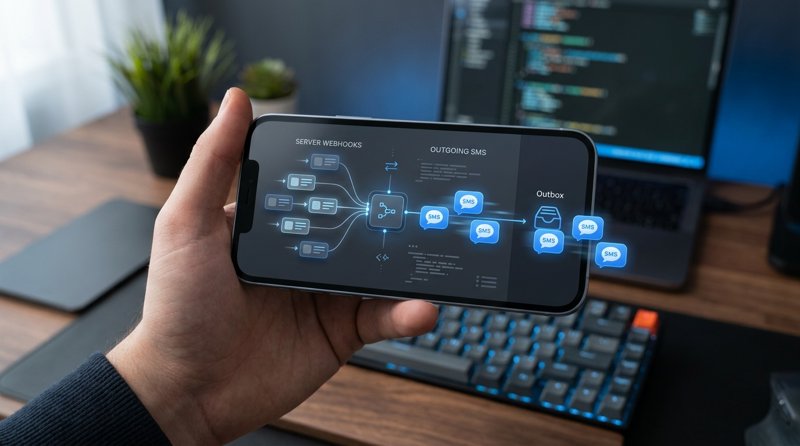
Are you looking to transform a webhook into an SMS to send instant alerts or appointment confirmations to your clients? Whether it's a Stripe notification, an event in your CRM, or a monitoring alert, routing this data to a mobile device is essential for your business's responsiveness. In this practical guide, we will see how to set up this communication bridge in a simple, cost-effective way, without the administrative constraints of traditional operators.
Why transform a webhook into an SMS?
A webhook is a mechanism that allows one application to transmit data in real-time to another application as soon as an event occurs. It is the equivalent of an automatic notification. However, receiving a webhook on a server or a Slack channel isn't always enough, especially when the information requires immediate attention.
This is where the value of transforming a webhook into an SMS lies. SMS remains the most direct and effective communication channel, boasting an open rate of over 98% within minutes of receipt. For small businesses, medical clinics, driving schools, or repair services, this responsiveness means fewer missed appointments and improved customer satisfaction.
- Appointment Reminders: Send an SMS as soon as your booking software (Calendly, Doctolib, etc.) generates a confirmation webhook.
- Payment Alerts: Instantly inform your clients or teams when a Stripe or PayPal transaction succeeds or fails.
- Order Tracking: Notify your customers that their package is ready for pickup as soon as your inventory management tool updates the status.
- Security or Monitoring Alerts: Receive an emergency SMS if your server goes down or if an anomaly is detected.
The obstacles of traditional SMS gateways
Historically, to transform a webhook into an SMS, developers and integrators turned to giants like Twilio, Plivo, or MessageBird. However, the game has changed in 2026. These platforms now impose heavy constraints that slow down deployment and drastically increase costs for small structures.
Here are the main obstacles encountered with classic SMS APIs:
- Strict regulatory validation (10DLC, A2P): To send SMS via Twilio in the United States or Europe, you must go through long brand registration procedures, submit your use cases, and wait for operator approval. This can take weeks.
- Complex pricing and segment billing: Traditional gateways charge for each 160-character segment. If your message contains an accent or slightly exceeds this limit, you pay double or triple. Additionally, you must rent a virtual number monthly.
- Lack of number recognition: Your customers receive messages from a generic short code or an unknown virtual number, which reduces trust and response rates.
To bypass these obstacles, using an Android SMS gateway like MySMSGate stands out as the most agile and economical solution. You send your messages directly from your own mobile plan and your own SIM card, without any tedious registration procedures.
Comparison of costs and implementation simplicity
| Criterion | Traditional Gateway (e.g. Twilio) | MySMSGate (Android Gateway) |
|---|---|---|
| Cost per SMS | $0.05 to $0.08 + segment billing | $0.02 (flat rate per message, regardless of length) |
| Monthly subscription | Yes (number rental + setup fees) | None (no contract, no commitment) |
| Operator validation (10DLC / A2P) | Mandatory and complex (several weeks) | None (ready in 2 minutes) |
| Sender number | Unknown or premium virtual number | Your own mobile phone number |
| Refund in case of failure | Rarely applied | Automatic and instant |
Step-by-Step Tutorial: Configure your gateway to transform a webhook into SMS
To achieve this integration without friction, we will use MySMSGate. The principle is simple: your webhook source sends data to MySMSGate (either directly via the API or via an automation tool), which then transmits the sending order to your connected Android phone via the dedicated mobile app. Your phone sends the actual SMS using your SIM card.
Here is how to proceed step by step to set up this system.
Step 1: Create your account and connect your Android phone
To start, go to the registration page to create a free account on MySMSGate. Once logged into your dashboard, you will get your personal API key and a unique QR code.
Then, download the MySMSGate Android app on the phone that will serve as the gateway (you can use an old phone connected to Wi-Fi with an active SIM card). Open the app and scan the QR code displayed on your computer screen. Your phone is now instantly connected, without any complicated technical configuration.
Step 2: Understand how the MySMSGate API works
MySMSGate provides developers with an extremely simplified REST API with a single endpoint for sending messages. You can consult the MySMSGate API documentation for more details, but here is the basic structure of the POST request:
POST https://mysmsgate.net/api/v1/send
Headers:
  Authorization: Bearer YOUR_API_KEY
  Content-Type: application/json

Payload:
{
  "to": "+33612345678",
  "message": "Hello, your appointment is confirmed for tomorrow at 2 PM."
}
Thanks to this simplicity, any script capable of triggering an HTTP POST request can easily transform a webhook into an SMS in just a few lines of code.
Step 3: Configure no-code automation (Zapier, Make, n8n)
If you are not a developer, you can use visual integration platforms like Make.com, Zapier, or n8n to intercept your webhooks and send them to MySMSGate. This is the ideal method for managers of hair salons, garages, or medical practices.
- Create a scenario: In Make or Zapier, define the trigger as "Custom Webhook." Copy the URL provided by the platform and paste it into your source tool (Stripe, Calendly, WooCommerce).
- Add an HTTP / Webhook module: Configure the next action to perform a POST request to
https://mysmsgate.net/api/v1/send. - Map the data: Associate the customer's phone number from the webhook with the
tofield, and compose your personalized message in themessagefield by inserting dynamic variables (like the customer's name or appointment time). - Activate the scenario: Run a live test. As soon as the source webhook is triggered, your Android phone sends the notification SMS in less than 3 seconds.
Code examples to transform a webhook into SMS
For developers and system administrators who prefer to code their own middleware solution to process and filter webhooks before sending them, here are two ready-to-use code examples.
These examples show how to receive an incoming webhook (for example, from a monitoring server) and call the MySMSGate API to send the alert SMS.
Example in Python (Flask)
This Flask script listens for incoming webhooks on port 5000, extracts the phone number and message, and then transmits them to MySMSGate.
from flask import Flask, request, jsonify
import requests

app = Flask(__name__)

MYSMSGATE_API_KEY = "YOUR_MYSMSGATE_API_KEY"
MYSMSGATE_URL = "https://mysmsgate.net/api/v1/send"

@app.route('/webhook', methods=['POST'])
def handle_webhook():
    data = request.json

    # Webhook data extraction (adjust according to source)
    phone_number = data.get("phone")
    alert_message = data.get("alert")

    if not phone_number or not alert_message:
        return jsonify({"error": "Missing data"}), 400

    # Send SMS via MySMSGate
    headers = {
        "Authorization": f"Bearer {MYSMSGATE_API_KEY}",
        "Content-Type": "application/json"
    }
    payload = {
        "to": phone_number,
        "message": alert_message
    }

    response = requests.post(MYSMSGATE_URL, json=payload, headers=headers)

    if response.status_code == 200:
        return jsonify({"status": "SMS sent successfully"}), 200
    else:
        return jsonify({"status": "Sending failed", "details": response.text}), 500

if __name__ == '__main__':
    app.run(port=5000)
Example in Node.js (Express)
Here is the Node.js version using Express and the native fetch library to accomplish the same webhook-to-SMS redirection task.
const express = require('express');
const app = express();
app.use(express.json());

const API_KEY = 'YOUR_MYSMSGATE_API_KEY';

app.post('/webhook', async (req, res) => {
    const { phone, message } = req.body;

    if (!phone || !message) {
        return res.status(400).json({ error: 'Missing required fields' });
    }

    try {
        const response = await fetch('https://mysmsgate.net/api/v1/send', {
            method: 'POST',
            headers: {
                'Authorization': `Bearer ${API_KEY}`,
                'Content-Type': 'application/json'
            },
            body: JSON.stringify({
                to: phone,
                message: message
            })
        });

        const result = await response.json();
        return res.status(200).json({ success: true, result });
    } catch (error) {
        return res.status(500).json({ error: 'Error while sending SMS', details: error.message });
    }
});

app.listen(3000, () => console.log('Webhook server active on port 3000'));
To go further and discover other integration examples in different languages (PHP, Go, Ruby), don't hesitate to consult our complete guide on how to send SMS from an Android phone via API.
Exclusive advantages of MySMSGate for your automations
By choosing to use MySMSGate to transform your webhooks into SMS, you benefit from advanced features designed specifically to simplify life for professionals and developers:
- Multi-device management: If you own several agencies or branches, you can connect one Android phone per agency on the same MySMSGate account. You can thus dynamically choose from which phone (and therefore which local number) to send each SMS.
- Dual SIM support: Use two SIM cards on a single phone to separate your message flows or optimize costs based on the recipient's operator.
- Automatic refund in case of failure: If an SMS cannot be delivered (number not assigned, network issue), your MySMSGate balance is instantly credited back.
- No commitment fees: Unlike the expensive monthly subscriptions of classic gateways, MySMSGate works on a simple top-up model. The rate is $0.02 per SMS sent, with a minimum purchase of only $5.00 (for 250 SMS). It is the ideal solution to test your project without financial risk.
- Incoming SMS reception: Our app doesn't just send messages. It also forwards all SMS received on your phone directly to your web dashboard as chat-style conversations, allowing you to reply directly from your computer.
Frequently Asked Questions about converting webhooks to SMS
Here are the answers to the most common questions regarding setting up a webhook-to-SMS gateway.
Do I need a Twilio account to transform a webhook into SMS?
No, absolutely not. With MySMSGate, you don't need to create an account with Twilio or other telecom intermediaries. Your own Android phone serves as the sending gateway. This saves you from paying virtual number rental fees and exempts you from the complex regulatory validations specific to mass senders (A2P/10DLC).
What are the prerequisites for using MySMSGate?
You simply need an active MySMSGate account, a smartphone running Android (with the MySMSGate app installed), and an active SIM card with an SMS plan (generally unlimited with most current mobile operators). The phone must be connected to the Internet (Wi-Fi or mobile data) to receive API instructions in real-time.
Does the phone need to stay on and active at all times?
Yes, the phone must stay on and connected to the Internet to process requests instantly. However, our app includes an auto-wake-up system via priority push notifications. Even if the phone goes into sleep or battery-saver mode, it will wake up instantly to dispatch the SMS as soon as a webhook is detected.
Is there a character limit for sent SMS?
MySMSGate charges a single, flat rate of $0.02 per message sent, regardless of its length. Unlike traditional APIs that split and bill your messages in 160-character increments (segments), you maintain total and transparent control over your communication budget.


Comments (0)
Be the first to comment!