
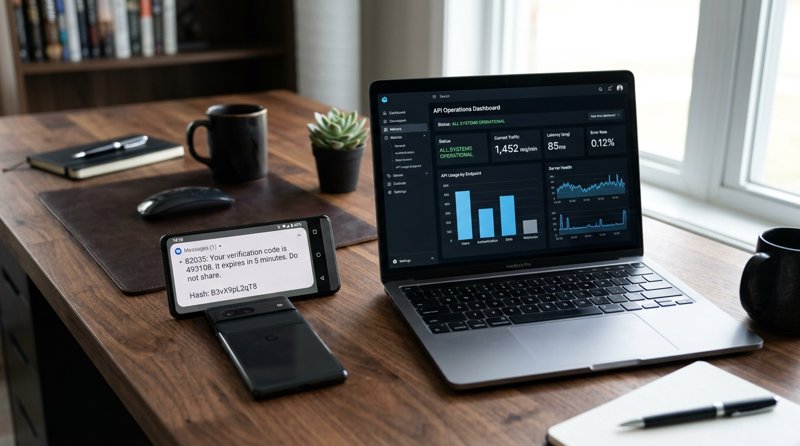
Have you ever received a one-time password (OTP) or verification code via text message and noticed a strange, random 11-character string of letters and numbers at the very end? If you are building a mobile application or managing customer notifications, understanding why android app needs few alphanumeric characters at the nd of the sms received is crucial for delivering a secure, frictionless user experience. In this comprehensive guide, we will demystify this cryptographic hash, explain how the Android SMS Retriever API works, and show you how to send these verification messages reliably and affordably.
Understanding Why Android App Needs Few Alphanumeric Characters at the Nd of the SMS Received
In the early days of mobile app development, when an app needed to verify a user's phone number, it would ask for permission to read all of the user's text messages. The app would request the READ_SMS or RECEIVE_SMS permission. Once granted, the app could scan every incoming message, look for a verification code, and automatically fill it in.
While this was incredibly convenient for users, it presented a massive security and privacy nightmare. Malicious apps could abuse this permission to spy on personal conversations, read sensitive bank alerts, and steal private data. To protect users, Google heavily restricted access to these permissions on the Google Play Store. Today, unless your app is the default SMS handler on the device, Google will reject your app if it requests broad SMS reading permissions.
This security enforcement created a new challenge: how can an app automatically read a verification code without compromising user privacy? The answer is Google's SMS Retriever API. And this API is the exact reason why android app needs few alphanumeric characters at the nd of the sms received. The strange 11-character code (such as FA+9qZSF7WV) is a unique cryptographic signature that allows the Android operating system to route that specific text message directly to your app, and only your app, without requiring any invasive permissions.
The Role of the Android SMS Retriever API
The SMS Retriever API allows your Android app to perform secure, phone-number-based verification without requiring the user to manually copy and paste the code. When an SMS arrives on the device, the Android system intercepts it. It looks at the very end of the message for that specific 11-character alphanumeric hash. If the hash matches your app's unique signature, Android extracts the message content and passes it directly to your app. The user never has to leave your app, open their messaging inbox, or type a single digit.
User Consent vs. SMS Retriever API
It is worth noting that Google offers two different APIs for this purpose: the SMS User Consent API and the SMS Retriever API. The User Consent API prompts the user with a dialog box asking for permission to read a single message. It does not require a special hash at the end of the text. However, it requires an extra tap from the user. The SMS Retriever API, which requires the 11-character hash, is completely automatic and invisible to the user, providing the absolute lowest friction onboarding experience possible.
How the 11-Character App Hash Code is Constructed
The alphanumeric string at the end of your SMS is not a random set of characters. It is a highly specific, deterministic cryptographic hash generated from your app's package name and its signing certificate. If even a single letter in your package name or your developer keystore changes, the hash will change entirely.
The construction of this 11-character string follows a strict process:
- The system takes your app's package name (for example,
com.example.myapp). - It appends the public key certificate signature of your app's helper credentials.
- It runs this combined string through a SHA-256 cryptographic hash function.
- The resulting hash is encoded using Base64.
- The first 11 characters of this Base64 string are extracted to become your app's unique SMS hash.
Because this hash is unique to your specific app and your developer signature, no other app on the user's phone can intercept the verification SMS. This prevents malicious apps from "sniffing" verification codes intended for your application.
The Exact SMS Format Required by Google
For the SMS Retriever API to successfully detect and route the message, the text must strictly adhere to a specific format. If you make a mistake in formatting, the auto-verification will fail, and your user will be forced to type the code manually. The message must meet the following criteria:
- The message must be no larger than 140 bytes (roughly 140-160 characters depending on encoding).
- The message must begin with the prefix
<#>or contain a zero-width space character at the start. - The message must end with the exact 11-character hash code generated for your app.
Here is an example of a perfectly formatted verification SMS:
<#> Your verification code is 482910.

FA+9qZSF7WV
Why This Matters for Small Businesses and Developers
If you run a local service business—such as a dental clinic, a hair salon, a tutoring school, or an auto repair shop—you might wonder why this technical developer detail matters to you. The answer lies in conversion rates, customer satisfaction, and operational costs.
When customers download your app to book appointments, check their service status, or access their accounts, they expect a modern, seamless experience. If your verification SMS does not use the SMS Retriever API, your customers have to navigate away from your app, open their text messages, memorize or copy a 6-digit code, switch back to your app, and type it in. For non-technical users or elderly clients, this minor friction often leads to abandoned sign-ups and lost business.
However, implementing this level of automation has historically been expensive. Traditional SMS APIs like Twilio charge high per-message rates, impose complex billing structures (charging you per 160-character segment), and require painful compliance procedures like A2P 10DLC registration and carrier approvals. If you append an 11-character hash to your SMS, it can easily push your message over the 160-character limit, causing Twilio to bill you for two messages instead of one.
This is where an Android SMS gateway tutorial becomes incredibly valuable. By using a service like MySMSGate, you can turn your own Android phone and SIM card into a powerful SMS gateway. You pay a flat rate of just $0.02 per SMS with no segment-based double billing, no monthly contracts, and absolutely no carrier registration hurdles. You can easily send your OTP messages with the required alphanumeric hashes directly through your own business phone number.
A Cost Comparison: Traditional SMS APIs vs. MySMSGate
Let's look at how the costs stack up for a local business sending 1,000 verification and notification messages per month. Traditional APIs charge not only for the message but also add carrier fees, registration costs, and segment penalties.
| Feature / Cost | Traditional API (e.g., Twilio) | MySMSGate Android Gateway |
|---|---|---|
| Price per SMS | $0.05 - $0.08 + Carrier Fees | $0.02 (Flat Rate) |
| Segment Billing | Yes (Billed per 160-char segment) | No (One flat charge per message) |
| A2P 10DLC Registration | Required (Takes weeks, costs money) | Not Required |
| Monthly Contracts/Fees | Yes (Numbers, profile maintenance) | No ($0.00/mo, pay-as-you-go) |
| Sender ID | Random shortcode or leased number | Your own recognized business number |
As shown in the table, MySMSGate is the clear winner for cost-conscious businesses. If you are looking for a cheaper way to keep your clients informed, check out our guide on the cheapest SMS API for small business.
How to Send OTP SMS with App Hashes Using MySMSGate REST API
Integrating MySMSGate into your mobile app backend to send secure, auto-verifying OTP messages is incredibly simple. Because MySMSGate provides a clean, single-endpoint REST API, you can write a integration in minutes. Below is a practical example of how to send an SMS containing your app's unique alphanumeric hash using Python and cURL.
First, you must obtain your app's 11-character hash code. You can generate this using keytool on your development machine or by using Google's AppSignatureHelper class in your Android project. Once you have your hash (e.g., FA+9qZSF7WV), you can trigger the API call from your backend server.
Python Code Example
Here is how you can send the formatted OTP message using Python's popular requests library:
import requests

api_url = "https://mysmsgate.net/api/v1/send"
headers = {
    "Authorization": "Bearer YOUR_API_KEY",
    "Content-Type": "application/json"
}

payload = {
    "to": "+1234567890",
    "message": "<#> Your verification code is 582910.\n\nFA+9qZSF7WV",
    "device_id": "your_connected_android_device_id",
    "sim_slot": 1
}

response = requests.post(api_url, json=payload, headers=headers)

if response.status_code == 200:
    print("OTP Sent Successfully!")
else:
    print(f"Failed to send OTP: {response.text}")
cURL Command Line Example
If you are testing from the command line or using a shell script, you can trigger the SMS with this simple cURL request:
curl -X POST https://mysmsgate.net/api/v1/send \
  -H "Authorization: Bearer YOUR_API_KEY" \
  -H "Content-Type: application/json" \
  -d '{
    "to": "+1234567890",
    "message": "<#> Your verification code is 582910.\n\nFA+9qZSF7WV",
    "device_id": "your_connected_android_device_id"
  }'
With MySMSGate, if a message fails to deliver for any reason (e.g., the destination phone is disconnected), your balance is automatically refunded. This ensures you only pay for successful outcomes.
How to Set Up MySMSGate for Your Mobile App in 4 Steps
Setting up MySMSGate to handle your app's verification messages is fast and requires no complex developer configurations. You can start sending automated messages in under five minutes.
- Step 1: Create Your Free Account
Go to MySMSGate Register and set up your account. You will instantly receive access to your web dashboard and your API keys. - Step 2: Connect Your Android Device
Download the MySMSGate Android app onto any spare Android phone containing your business SIM card. Scan the QR code displayed on your web dashboard using the app. The phone will instantly link to your account—no manual API keys required. - Step 3: Generate Your App Signature Hash
Use Google's signature helper tools to extract the 11-character cryptographic hash for your production Android app. Keep this code handy for your SMS templates. - Step 4: Trigger Your First OTP via API
Integrate our simple REST API endpoint into your backend registration flow. Format your verification message with the<#>prefix and append your 11-character hash at the end. Your connected Android phone will instantly broadcast the message using its active SIM card.
By routing messages through your own phone, your customers will receive verification codes from a number they already know and trust, dramatically increasing your conversion and read rates.
Frequently Asked Questions
Below are answers to the most common questions developers and business owners ask regarding Android SMS verification hashes and gateway setups.
What is the 11-character code at the end of an SMS?
It is a unique cryptographic signature generated from your Android app's package name and its developer signing certificate. It is used by the Android SMS Retriever API to safely route verification messages directly to your application without requesting broad SMS reading permissions.
Can I generate the Android SMS hash code myself?
Yes. You can generate the hash code using command-line tools like keytool and openssl on your development machine, or programmatically within your app using Google's helper classes. It must be generated using the same keystore file you use to sign your production app for the Google Play Store.
Why did Google restrict the READ_SMS permission for Android apps?
Google restricted the permission to protect user privacy. In the past, malicious apps would request SMS reading permissions under the guise of verification, only to spy on personal messages, banking alerts, and private data. The SMS Retriever API solves this by only exposing the specific message intended for your app.
Does MySMSGate support sending SMS with alphanumeric hashes?
Yes, absolutely. MySMSGate sends raw, unfiltered SMS messages exactly as you format them. You can easily include the <#> prefix and the 11-character hash code in your API payloads. Your Android phone will send the message exactly as requested, and the recipient's phone will parse it successfully.
How much does it cost to send verification SMS via MySMSGate?
MySMSGate charges a flat rate of $0.02 per SMS. Unlike traditional APIs, there are no monthly platform fees, no contract minimums, and no segment-based double billing. You pay a single flat rate even if your message exceeds 160 characters due to the app hash code. You can learn more by reading our Twilio alternatives comparison.


Comments (0)
Be the first to comment!